
How to uninstall AppSell (Wix, Shopify and WooCommerce)
Pause or remove AppSell cleanly: what to do first, how to uninstall on each platform, and what happens to your funnels, discounts and billing.
Removing AppSell takes a minute. A couple of quick steps first make sure no discounts keep running after the app has gone.
Just want a break? Pause instead
To stop showing offers without losing anything, switch each funnel off with its Status toggle in My funnels — see how to manage your funnels. Your plan stays active, so switch funnels back on whenever you like.
Before you uninstall
Delete any volume bundle funnels (Wix). Volume bundle discounts are Wix automatic discounts, and deleting the funnel in AppSell is what removes them. If you uninstall first, they keep discounting until you remove them in Wix yourself.
Decide about your discount codes. Codes AppSell created for your offers stay in your store's coupons after you uninstall. Leave them, or delete them in your store admin once AppSell is removed.
Uninstall on Wix
In your Wix dashboard, go to Apps → Manage Apps.
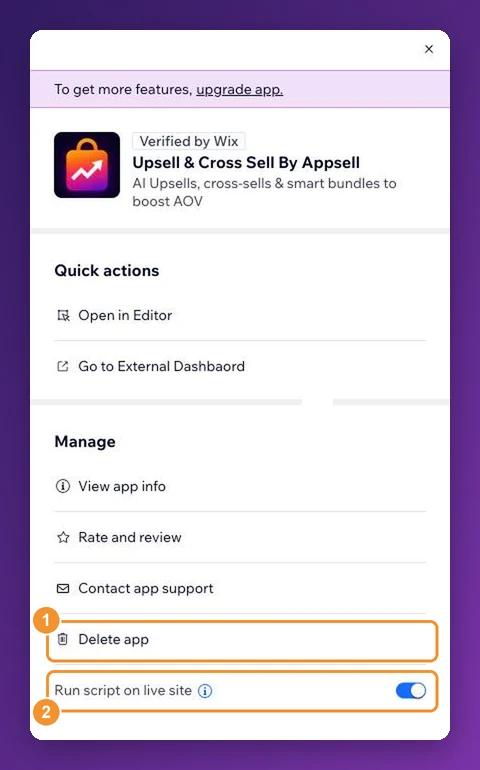
Find Upsell & Cross Sell By Appsell and open its ⋮ menu.
Click Delete app and confirm.
Cancel the AppSell subscription in your Wix account's subscriptions if it's still listed — see plans and billing on Wix.
Uninstall on Shopify
In your Shopify admin, go to Settings → Apps.
Find AppSell, open its ⋯ menu and choose Uninstall.
App charges on Shopify are billed through your Shopify invoice and end when the app is uninstalled.
Uninstall on WooCommerce
In WordPress, go to Plugins.
Click Deactivate under AppSell, then Delete.
Removing the plugin doesn't cancel your AppSell subscription. Contact support to cancel it, and include your store URL.
What happens afterwards
Offers stop showing on your store.
Your funnels are kept. If you reinstall from the same store, they're there waiting. Check each one's settings before switching it back on.
Discount codes AppSell created stay in your store until you delete them.
If something didn't work for you, we'd like to hear about it — tell support; most setup problems are solved in one reply.
Still stuck?
Tell support what you were doing and what happened instead — a store URL and a screenshot of the funnel settings usually resolves it in one reply.
Contact support