
Discount not applied at checkout? How to fix it
A shopper accepted an offer but didn’t get the discount. Work through these checks, from the quickest to the least common.
AppSell creates a discount code for every offer that has a discount, and applies it for the shopper when they accept. When the discount is missing at checkout, the cause is almost always one of the checks below. Work through them in order.
Quick checks
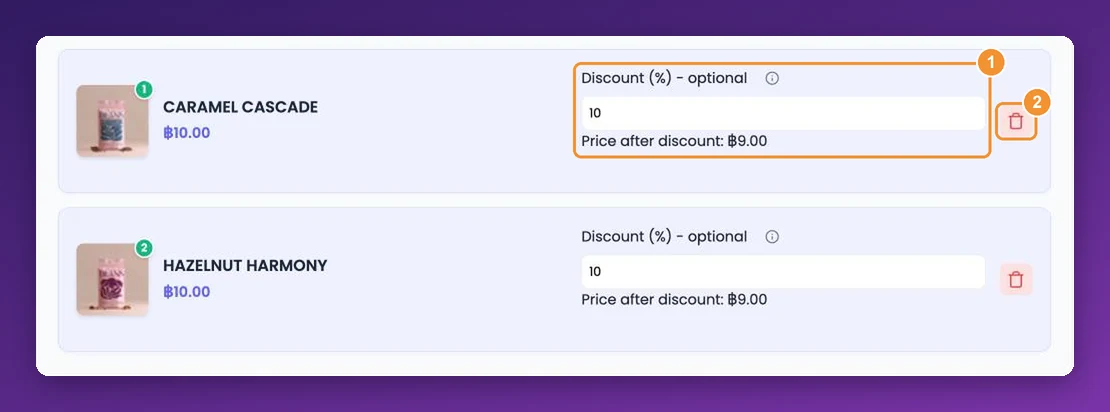
Is a discount set? Open the funnel with Customize and check the discount value is above 0. In the products step, Price after discount confirms it.
Did you save recently? Discount codes are created in the background after you save, which can take up to a minute. Test again after a short wait.
Is the AppSell code still in your store? Codes start with your discount prefix, such as APPSELL-K3F9QX. If one was deleted or switched off in your store's coupons, open the funnel and save it again.
Did the shopper use another coupon? Wix allows one coupon per order, so a different code replaces AppSell's.
Did they add the product through the offer? AppSell applies the code when the shopper accepts the offer. A product added with your store's normal Add to Cart button doesn't get the offer's discount.
Are your visitor credits used up? At the limit, offers pause — check credits used in the dashboard sidebar.
Checks by offer type
Product upsell
The discount applies to one unit of the offered product.
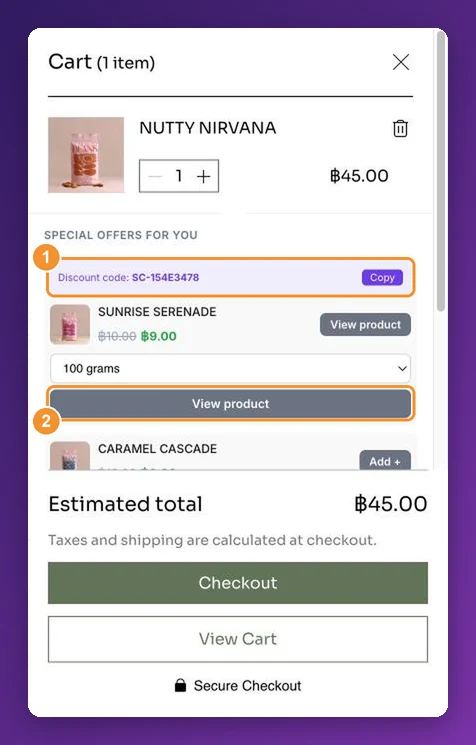
When the offer sends shoppers to the cart, the code is entered in the cart's promo-code box a few seconds after the cart page loads. Make sure your cart page shows Wix's promo-code field.
Frequently bought together
Without Apply discount for partial bundles, the shopper must keep every item ticked to get the discount.
If you change a bundle's products, create a new funnel for the new bundle rather than editing the old one.
Cart and side cart offers (Wix)
Use Percentage for the bundle discount.
Each shopper gets a one-time code; an old code from an earlier visit won't work again.
Volume bundles (Wix)
Use Percentage tiers, listed from the smallest quantity to the largest.
Wix limits how many automatic discounts a site can have. If the list in your Wix dashboard is full, delete ones you no longer use.
The discount appears once the quantity in the cart reaches a tier — 2 items for a "buy 2" tier.
Platform notes
Shopify: the discount is attached to the shopper's session and appears at checkout.
WooCommerce: the code is entered automatically on the classic cart page. If your store uses the newer Cart block, shoppers need to enter the code themselves — or switch your cart page to the classic cart.
Still not working?
Contact support with your store URL, the funnel name, and a screenshot of the cart or checkout — that's usually enough to solve it in one reply.
Still stuck?
Tell support what you were doing and what happened instead — a store URL and a screenshot of the funnel settings usually resolves it in one reply.
Contact support