
Upsell ideas by store type: what to offer and where
Ready-to-use upsell, cross-sell and bundle ideas for fashion, beauty, food, home, electronics, pet and service businesses — with the AppSell funnel to use for each.
The best upsell feels like good advice: the thing a helpful shop assistant would suggest next. Below are proven offer ideas for common kinds of stores, each matched to the AppSell funnel and page that suits it. Pick two or three that fit your catalog, set them up, and let them run for a couple of weeks before judging the results.
Pick the right funnel for the job
| Goal | Funnel | Where |
|---|---|---|
| Sell more of the same product | Volume bundle discount (buy 2, save 10%) | Product page |
| Sell items that are used together | Frequently bought together | Product page or cart |
| Offer a better version | Product upsell as an Upsell (replaces the item) | Product page or cart |
| Add a small extra | Product upsell as a Cross-Sell | Cart or side cart, checkout |
| Win a second order | Product upsell with a discount | Thank-you page |
Not sure where to start? The AI funnel generator reads your catalog and proposes funnels for you.
Fashion and accessories
Complete the look — on a dress or shirt page, a frequently bought together bundle with the matching belt, bag or shoes.
Multipacks — volume bundle tiers on socks, underwear and basic tees: buy 3, save 15%.
Small add-ons in the side cart — hair accessories, care products, gift wrap.
Beauty and skincare
Build the routine — cleanser, serum and moisturiser as a bundle on each product page.
Bigger size — an Upsell from the 50 ml to the 100 ml on the cart page, with the saving per ml in the headline.
Refill reminder — on the thank-you page, the same product with a discount for the next order.
Food, coffee and drinks
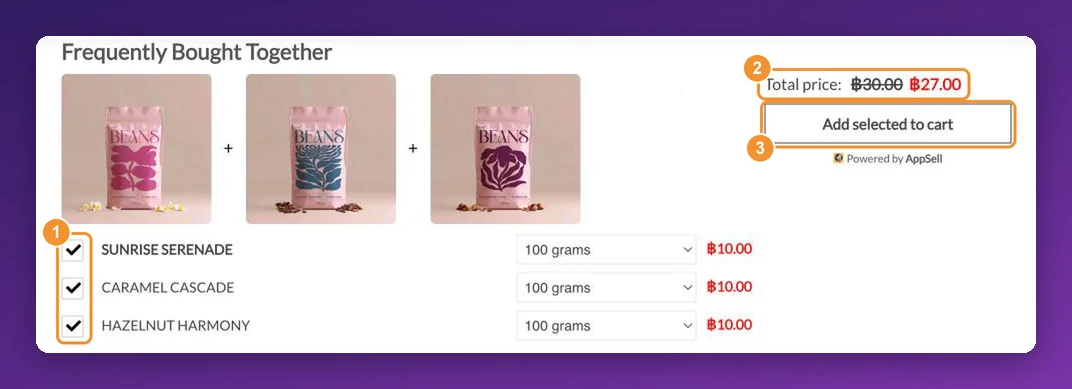
Try more flavours — a bundle of complementary blends or flavours on each product page.
Stock up — volume tiers on everyday items: buy 2 bags, save 10%.
The extras — filters, a mug or snacks as a cross-sell in the cart, triggered by the main product.
Home and decor
Matching set — cushions with the throw, the second lamp for the pair, napkins with the tablecloth.
Care and protection — fabric protector, cleaning kits or bulbs at checkout.
Room by room — use triggers to show bathroom items only when a bathroom product is in the cart.
Electronics and gadgets
Must-have accessories — case, cable, charger, memory card. A cart offer triggered by the main device works best.
The upgrade — an Upsell to the model with more storage or the pro version on the product page.
Protection — an extended warranty or care plan, if you sell one as a product, at checkout.
Pet supplies
Food in bulk — volume tiers on food and litter.
Treats at the till — low-priced treats or toys in the side cart for every order.
New pet kit — bowl, lead and bed as a bundle on the starter product.
Services, classes and bookings
Take-home products — on a Wix Bookings service page, the products used in the treatment or class. See offers on Wix Bookings pages.
Gift cards and vouchers — sold as products, offered in the cart around holidays.
Digital extras — guides, templates or recordings at checkout.
Rules of thumb for any store
Keep add-ons cheaper than the main item. Extras at about a quarter of the order value or less are the easiest yes; upgrades can cost more because they replace the item.
Make it relevant. Use triggers so each offer matches what the shopper is looking at or has in the cart. A relevant offer beats a big discount.
Give a reason to act now. A modest discount (10–15% is plenty) or a countdown timer.
One clear offer per page. Only one product upsell offer shows on a page at a time, so pick the best one — funnel order decides when several match.
Measure, then adjust. Give each offer two weeks, then compare funnels in your dashboard — see reading your results.
Still stuck?
Tell support what you were doing and what happened instead — a store URL and a screenshot of the funnel settings usually resolves it in one reply.
Contact support